




With the rising demand for a reliable Pokémon GO spoofer, many players want greater flexibility to explore the game and catch region-exclusive Pokémon. However, concerns about Error 12, GPS detection, and account bans still remain common.
iAnyGo Pokémon Go spoofer stands out as a game-changing location changer designed to minimize such risks. As a safe, no-jailbreak solution for iOS and Android, Tenorshare iAnyGo enables smooth and realistic location spoofing without compromising device security or gameplay stability. In this review, we take a closer look at its features, safety, and overall performance for Pokémon GO players.

Our Verdict: Is iAnyGo safe for Pokemon Go Spoofing in 2026 ?
Yes, Tenorshare iAnyGo supports safe flying in Pokémon GO by using an exclusive Bluetooth hardware technique, reducing risks of Error 12 and account bans. Unlike many Pokémon GO spoofing tools that rely on system-level modifications, this approach allows location changes to remain more stable and less intrusive.
Backed by Tenorshare’s more than ten years of experience in building reliable mobile utility software, iAnyGo keeps up with the latest technology, with regular updates to adapt to the evolving needs of Pokémon GO players. Positive feedback across communities like Reddit and Trustpilot further reinforces its credibility for Pokémon GO spoofing in 2026.
Pros
- Exclusive Bluetooth spoofing technology
- No jailbreak or root required
- Wide device compatibility
- Beginner-friendly interface, spoofing in one click
- Regular updates and long-term team support
Cons
- User discipline is still necessary
- Requires a computer connection for safe spoofing
| Pokémon GO Spoofers | Platform supported | Stability | Ban Risk Level | Update Frequency | Overall |
| iAnyGo | Windows, Mac, iOS and Android | ★★★★☆ | Low | Frequent | ★★★★★ |
| iPoGo | iOS and Android | ★★★☆☆ | Medium | Regular | ★★★★☆ |
| PGSharp | Android only | ★★★★☆ | Medium | Regular | ★★★☆☆ |
| iSpoofer | iOS only | ★★☆☆☆ | High | Rare | ★★☆☆☆ |
| IToolsBT | iOS only | ★★★☆☆ | Low | Occasional | ★★★☆☆ |
Part1: What is iAnyGo Pokémon GO Spoofer?
Tenorshare iAnyGo is a cross-platform location changer that supports iOS, Android, Windows, and macOS. It allows players to have easy & safe spoofing in Pokemon GO / other LBS Apps without any jailbreak and rooting.
The key features such as Pokemon go joystick mode, route simulation and jump teleport give players flexible movement options while keeping gameplay behavior realistic. Besides that, iAnyGo also offers new features specific for Pokemon Go players. With Pokemon GO auto catcher for hands-free gameplay and the Pokemon map showing nearby Pokémon and Gyms, iAnyGo provides a care-free safe flying experience for the Pokemon GO players.
Part 2: Is iAnyGo Safe as a Pokémon GO Spoofer?
Yes, Tenorshare’s solid developer background makes iAnyGo gain great feedback for its safety. While many tools market themselves as a one click spoofer, the actual level of risk often depends on how the software works behind the scenes. To evaluate whether iAnyGo is a safe Pokémon GO spoofer, it’s important to look at several key factors.
Brand Legitimacy & Developer Background
iAnyGo location spoofer is invented by Tenorshare, a recognized software company with over ten years of experience in mobile utilities, providing iAnyGo with a solid technical foundation and a credible development background.
Secure Installation Process
As a one click spoofer, iAnyGo works without requiring jailbreak on iOS or root access on Android. By avoiding system-level modifications, it reduces common risks associated with unstable or intrusive Pokémon GO spoof tools.
Data Privacy
Tenorshare states that the software does not collect or share individual location data. GPS movements remain within the application, and such data is not sold to third parties, which is important for privacy-conscious Pokémon GO spoof users.
Wide Device Compatibility
Tenorshare keeps iAnyGo actively updated, allowing it to support both iOS and Android devices across their latest system versions (both iOS 26 & Android 16 supported). This ongoing compatibility helps ensure stable performance and reduces issues caused by system or app updates.
User Reviews
Long-term users frequently share positive feedback on platforms like Reddit, highlighting stable performance over extended use. In addition, iAnyGo holds an average rating of around 4.8 stars on Trustpilot, further supporting its credibility among Pokémon GO spoofing users.
Part3: How to Spoof Pokémon GO with iAnyGo (Step-by-Step)
Step1:Install the latest version of iAnyGo on your computer.
Step 2: Connect your phone to the computer via USB and tap Enter to proceed.
Step 3: Choose your preferred mode(Auto-Catch in Game Mode!)
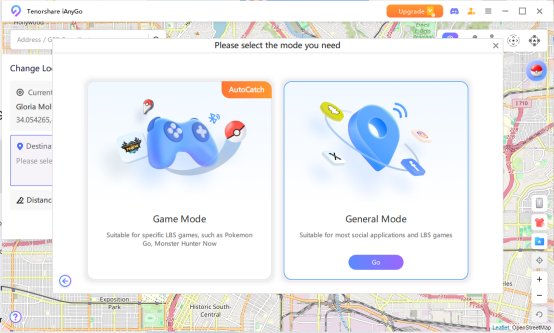
Step 4: If it’s your first time, pair your phone’s Bluetooth with the PC (skip if already paired).
Step 5: In Pokémon GO, set Location permission to Always Allow.
Step 6: To enable the Auto-Catch, open the game, go to Settings > Connected Devices & Services > Accessory Devices, select Pokémon GO Plus, and pair it with Auto-Catch.
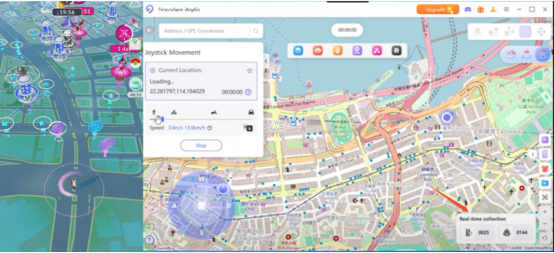
Step 7: Once connected, you’ll see real-time stats of Pokémon caught and items collected.
Part 4: Top Tips for Safely Spoofing Pokémon GO
1. Be Aware of Cooldown Times
Always respect cooldown rules after actions like catching Pokémon, spinning PokéStops, or teleporting. Following realistic cooldown times helps reduce abnormal behavior flags and is essential when using any spoofer in Pokémon GO. This practice reflects real-world travel limits and improves account safety.
2.Use Automatic Movement and Route Simulation
Make good use of joystick & route simulation to mimic natural player movement. Gradual speed changes and curved paths look more human-like, making the best Pokémon GO GPS app safer and more reliable for long-term use.
3.Avoid Frequent Long-Distance Teleports
Jumping between far-apart locations in short periods is a common trigger for detection. Stick to local or regional movement patterns to maintain consistency and credibility in your gameplay behavior.
4.Keep Apps Updated
Regular updates ensure compatibility with the latest Pokémon GO versions and security patches. Trusted developers often optimize spoofing logic to stay aligned with game updates, improving stability and safety.
5.Don’t Mix Multiple Spoofing Tools
Using more than one spoofing app can cause conflicts and abnormal data signals. Choose one reputable Pokémon GO spoofer and use it consistently to minimize risks and maintain a clean usage profile.
Part 5: FAQ
How to spoof in Pokémon GO?
Pokémon GO spoofing usually involves using a location spoofer that allows controlled GPS changes while following cooldown rules. Tools like iAnyGo focus on stable location simulation rather than modifying game files, which helps reduce abnormal behavior.
How to spoof location on iPhone?
On iPhone, location spoofing is commonly done through desktop-based tools such as iAnyGo, which work without jailbreak and keep system integrity intact.
What if Pokémon GO shows “GPS signal not found”?
This error often results from unstable spoofing methods. Using a well-maintained spoofer like iAnyGo, along with restarting location services, can help restore proper GPS detection.

