



In today’s visually driven world, whether you are a professional creator or an ordinary Android user, having a powerful photo editor is essential for daily needs. While countless apps flood the application market, three stand out for their unique AI-driven capabilities, Android-optimized interfaces, and transformative results: Picwand, Canva, and Picsart. Here’s how each app elevates mobile editing—and why they belong in your creative toolkit.
1. Picwand: AI-Powered Precision for Stunning Visual Clarity
Picwand dominates the Android photo editing field with its cutting-edge AI-enhanced algorithms, aiming to solve the most challenging image quality issues directly on your device. Unlike traditional editors, Picwand focuses on intelligent restoration and upgrades, making it an indispensable part of personal memories and professional projects.

Key Strengths for Android Users:
- 4K/8K Image Upscaling: Transform low-resolution or blurry photos into ultra-sharp masterpieces. You can easily upscale an image to 4k through PicWand in seconds. Picwand’s AI analyzes each pixel to reconstruct details without artificial artifacts—perfect for enlarging smartphone shots for prints or digital displays.
- Old Photo Restoration: Revive faded, scratched, or monochrome images with one-tap restoration. The AI intelligently repairs damage, colorizes black-and-white photos, and enhances contrast, breathing new life into historical treasures.
- Night Scene & Noise Correction: Clean up grainy, low-light shots effortlessly. Picwand’s denoising AI preserves critical details while eliminating noise, making night photography look professionally processed.
- Portrait Perfection: Elevate selfies and portraits with AI-driven skin retouching, facial feature enhancement, and natural tone adjustments. The algorithm respects original textures, avoiding the “over-smoothed” look common in mobile apps.
- All-in-One Video & Photo Suite: Not only for image editing, Picwand also offers video upscale and enhance functions. Android users can smoothly perform professional-level video processing and editing on their devices.
Picwand is renowned for its comprehensive image processing tools and user-friendly operation. Its powerful functions can provide Android users with fast and highly effective image processing results. For example, Object Remover. This function can help users quickly remove the unnecessary parts in the picture and maintain the texture of the original picture. Another example is the AI Art Styles function. Its powerful style library offers users multiple choices. You can select any appropriate style for processing portrait or landscape pictures, such as Oil Painting or Ghibli for human faces, or Colored Pencil for landscapes.
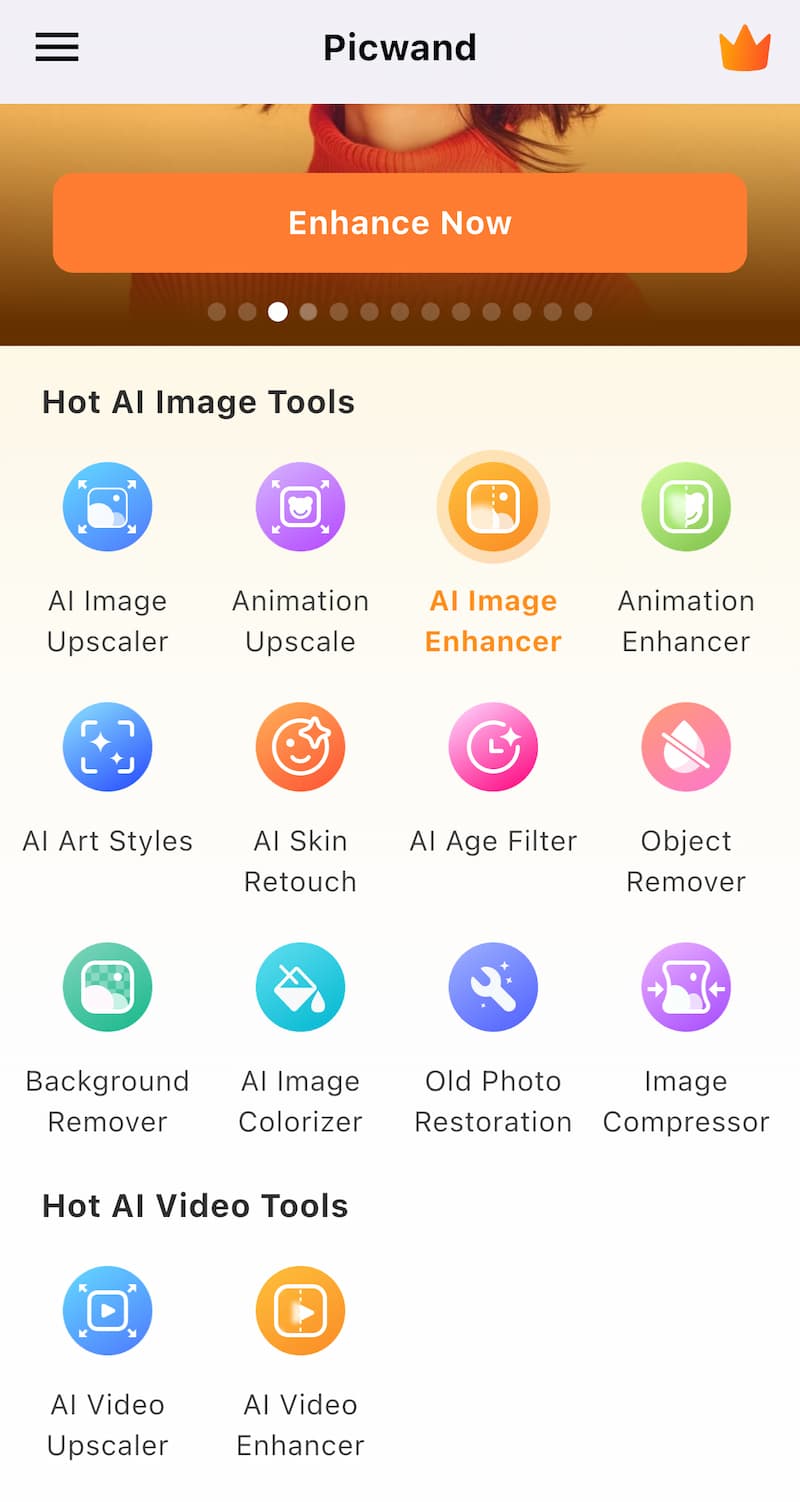
Focuses on computational photography to overcome hardware limitations (e.g., noise, low resolution), turning average shots into gallery-worthy images. The most prominent feature of Picwand is its extremely simple operation. Most of its functions can be automatically completed by AI after users upload pictures. And Picwand's precise touch control also makes the handling of details a piece of cake.
2. Canva: The Design Powerhouse for Brand-Consistent Content
Canva transcends basic photo editing by integrating graphic design, branding tools, and social media templating into a single Android app. It is a very suitable software for entrepreneurs, advertising designers and any user who needs to design visual effects.
Key Strengths for Android Users:
- Easy-to-use image editing functions: Canva offers the most basic tools, including generating graphics on images, manually adding lines, and adding text boxes, etc. The simple operation process gives users great creative freedom. Although it may not be as exquisite as that generated by AI, manual operation is more in line with users' needs.
- Brand Kits for Consistency: Store logos, color palettes, and fonts to apply across designs instantly. This ensures every social media post, flyer, or presentation maintains unified branding.
- Template-Driven Creativity: Access 600,000+ customizable templates for Instagram stories, posters, or videos. Canva’s drag-and-drop editor simplifies complex designs, while Android-specific templates are optimized for mobile screens.
Canva’s mobile app features intuitive touch gestures, real-time collaboration, and direct social media scheduling. The interface adapts fluidly to smaller screens, making detailed editing feasible on phones.
3. Picsart: The Creative Playground for Expressive Edits
- Picsart caters to creators who crave artistic experimentation and viral-worthy effects. Its vast suite of tools—from AI image generation to advanced compositing—makes it a favorite among social media influencers and digital artists.
Key Strengths for Android Users:
- Image stitching function: Picsart offers image stitching templates such as Grids and Freestyle, allowing users to stitch images according to their preferred layout patterns, and ensuring the clarity and integrity of the resulting images to the greatest extent.
- Free and meticulous creation: Unlike other image processing applications, Picsart also offers users a space to create from scratch. You can start from a blank canvas and directly create your original works using tools such as Brush, Erase and Fill.
- Dynamic Effects & Stickers: Access 60+ million stickers, AR filters, and AI-driven styles (e.g., “sketch” or “watercolor”). Users can choose stickers and borders of different styles to process and manipulate the pictures.
Picsart’s mobile-first design includes a streamlined toolbar, one-touch presets, and cloud-saving for on-the-go projects. The diverse design options and the provided creative space can offer users great creative freedom.
Conclusion
While all three apps deliver robust Android experiences, their specialized effects target distinct needs: Picwand for technical perfection, including upscaling, restoration, and various filters operation; Canva for brand-aligned design featuring templates, branding tools, and social content creation, which is more suitable for business man or officer; or opt for Picsart for artistic expression with AI art, stickers, and layered compositions. Install one or all three to transform your Android device into a portable studio, where professional-grade visuals are just a tap away.

