




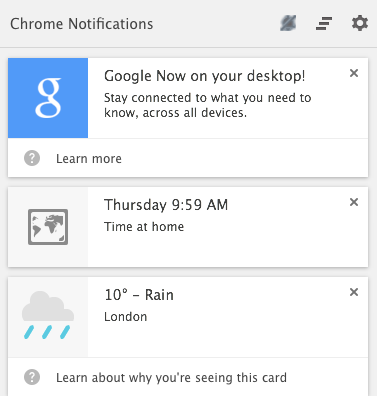
Who wants Google Now integration with the Chrome desktop? Well it's coming, and today's news is a hint that it could be here sooner rather than later. It is now available in the latest Google Canary build (34.0.1788). If you're not familiar with Google Canary, it is basically an Alpha build for either Windows or Mac. It is reserved for developers, but any “early adoption” fan can use it. Just expect bugs, but it does get updated daily.
Google Now cards are displayed using Chrome's notification interface in the Windows system tray or the Mac menu bar. Assuming you use Google Now on your mobile device, you will be able to see certain cards on the desktop including weather, sports scores, commute traffic, and even reminders. It will use your device's location for location-specific cards.
If you're already a Chrome Canary user, you need to enable Google Now by going to chrome://flags/#enable-google-now, and switching from “Default” to “Enabled.” Then restart your browser by clicking “Relaunch Now” at the bottom of the page. If you would like to try Google Canary, then hit the link below.
source: Google System Blogspot To Download: Google Canary
