Bringing Waze-inspired reporting to Google Maps
Since 2024, Google Maps users on Android Auto have been able to report and confirm incidents directly from their vehicle’s screen. This feature comes from Waze—another Google-owned navigation app—where drivers have long helped each other by sharing real-time road alerts.
Over time, reports of accidents, obstacles on the road, stopped vehicles, and police checks have become more common in Google Maps, thanks to gradual integration of Waze’s crowd-sourced data. The actual reporting feature itself wasn’t the problem for most users. The real headache was how these alerts often popped up and obscured key navigation info—like your next turn or current route details—right when you needed them most.
Alerts that used to cover critical directions
When an alert appeared, you could tap “Yes” or “No” to confirm it, or just wait a few moments for the pop-up to vanish. During those seconds, though, crucial navigation details were hidden. This left many drivers frustrated, since knowing where to turn in the next few hundred feet is usually more important than responding to a quick questionnaire.
Google’s new, less intrusive alert design
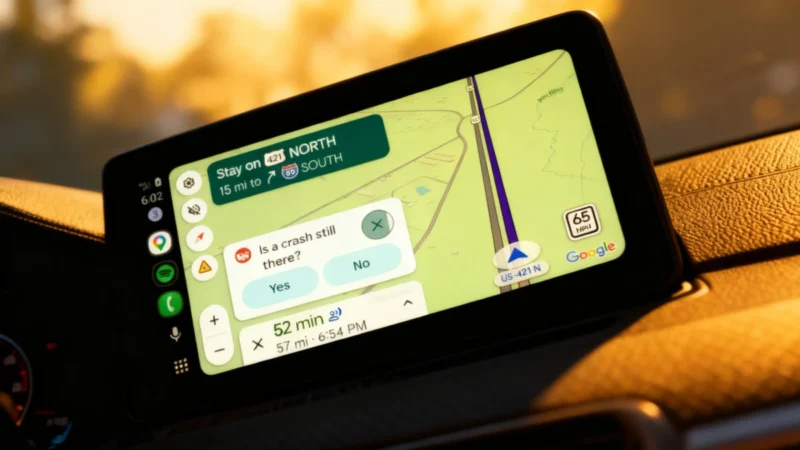
Now, Google has rolled out a redesign for these alerts on Android Auto. Instead of replacing parts of the interface, the pop-up fits into the layout so that your navigation info always stays visible. The confirmation question briefly displays, then automatically disappears—allowing drivers to ignore it without losing track of their route.
If you’re driving a vehicle with a tall, vertical screen, the change might not be dramatic. But on compact, widescreen displays—common in many recent cars—the improvement is much more noticeable. The screen can look a bit busier while the alert is visible, but it avoids the confusing and distracting movement of interface elements that previously plagued the experience.
Drivers can keep their eyes on the road
Google still encourages user participation in incident reporting, so the “Yes” and “No” options remain available. But now, drivers who prefer to keep both hands on the wheel and eyes on the road can simply let the alert disappear on its own. The update began rolling out server-side and has reached most Android Auto users as of mid-2026, without any major announcement or blog post from Google.
Want to keep up with the latest tech news? Follow Journal du Geek on Google and WhatsApp, and for daily updates, don’t miss their morning newsletter.