




Telegram has just pushed one of its most ambitious updates yet, headlined by what the company calls the biggest interface redesign in the history of its Android app. Alongside the visual overhaul, users are also receiving a new gift-crafting system, improved group ownership controls, and expanded tools for bot developers.
It’s a substantial release — and one that reshapes how Telegram feels on Android.
Massive redesign for Android
The headline change is a fully redesigned Telegram interface on Android. A new bottom navigation bar provides one-tap access to chats, settings, profile, and other core sections, making navigation in the app faster and more intuitive.
Under the hood, Telegram’s Android developers didn’t just tweak visuals — they rebuilt the interface code entirely. The goal is to improve responsiveness, increase efficiency, and enhance overall performance.
There’s also a new layer of control for performance-conscious users. Interface effects can now be adjusted via Settings > Power Saving, allowing you to prioritise smoother visuals or extend battery life depending on your needs.
On iOS, the app picks up additional Liquid Glass effects, including a redesigned media viewer, new preview panels for sticker and emoji packs, and refreshed context menus in profiles and message selections. iPad users also gain a new keyboard shortcut — ⌘ + Enter — to send messages faster.
Smarter group ownership controls
Telegram is tightening up how group ownership works, particularly when admins step away.
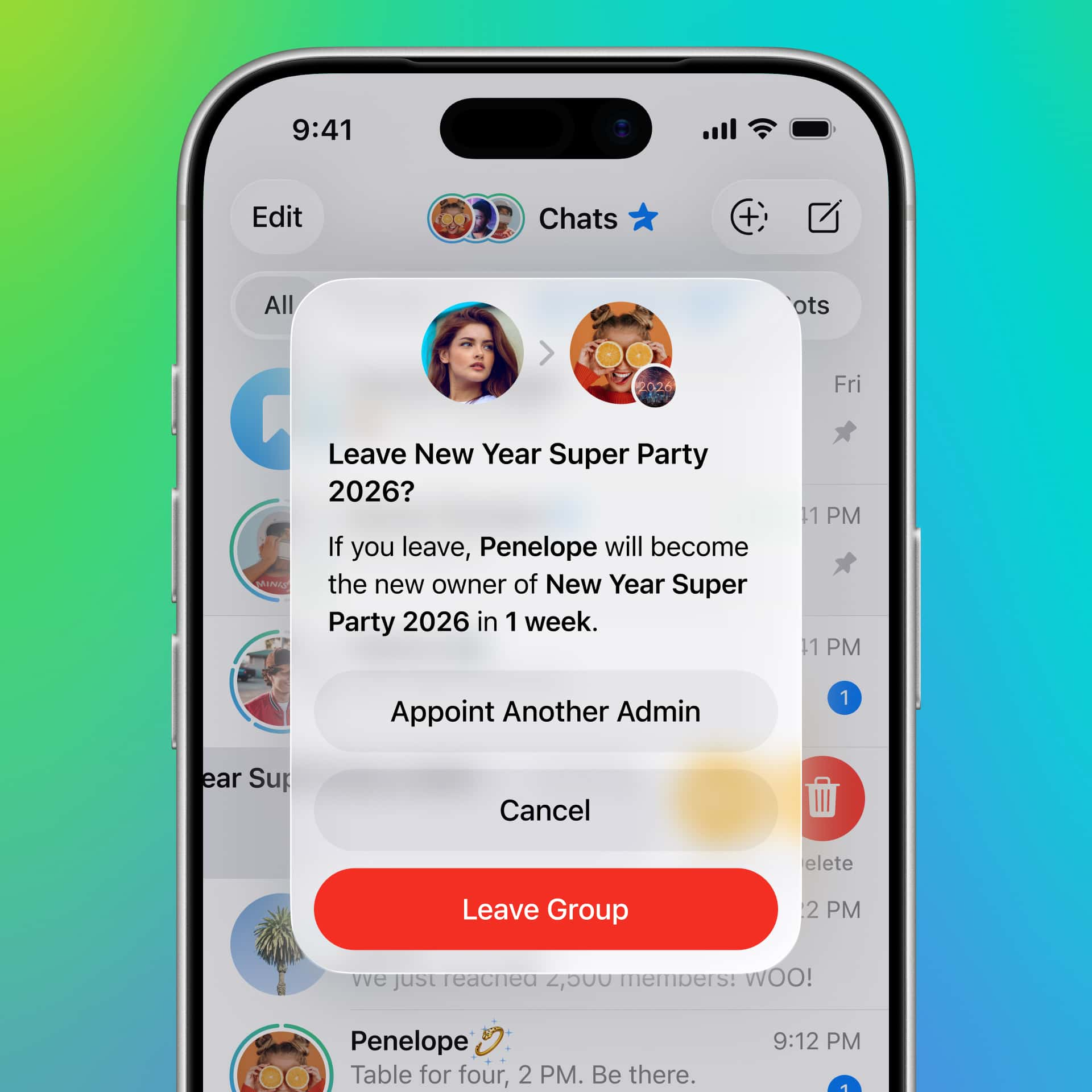
If a group owner leaves a chat without assigning a successor, ownership will now automatically transfer to one of the existing admins after one week. That prevents abandoned groups from becoming admin-less.
Owners are also shown a confirmation window before leaving, allowing them to instantly select a new owner. Alternatively, ownership can be transferred to another member at any time without the original owner leaving the chat.
It’s a practical update that should reduce friction in large communities and busy channels.
Gift crafting arrives
Telegram’s collectible gift ecosystem is expanding with the introduction of a new crafting system.
Users can now combine up to four existing collectible gifts to generate upgraded versions ranked as Uncommon, Rare, Epic, or Legendary. Each additional gift added increases the odds of a successful craft, and combining items with similar attributes raises the chances that those traits carry over into the final result.
The new crafting interface makes the process straightforward, while the existing Gift Marketplace continues to allow users to securely buy and sell collectible gifts within Telegram.
It’s a clear push toward deeper in-app engagement, blending digital collectibles with game-like mechanics.
More expressive bot buttons
Bot developers are getting upgrades, too. Buttons can now be customised with colours and emojis, making interfaces more intuitive and visually highlighting specific actions.
For developers building advanced workflows, Telegram has published a dedicated Bot API changelog covering the full scope of backend improvements.
Verdict
This isn’t just a cosmetic refresh. The Android redesign modernises Telegram’s navigation, the rebuilt interface promises tangible performance gains, and the new crafting system adds a layer of interactivity the platform hasn’t had before.
For everyday users, it’s a smoother, more polished Telegram. For power users and community admins, it’s a more capable one.



It’s awful…